Out of 41 entries, the following 10 wallpapers were selected. Congratulations to the winners! These should be included on the daily Focal Fossa (future 20.04 LTS) daily ISO images shortly.
Ubuntu Studio 20.04 LTS Community Wallpapers
Out of 41 entries, the following 10 wallpapers were selected. Congratulations to the winners! These should be included on the daily Focal Fossa (future 20.04 LTS) daily ISO images shortly.
Ubuntu Studio 20.04 LTS Community Wallpapers

As we begin getting closer to the next release date of Ubuntu Studio 20.04 LTS, now is a great time to show what the best of the Ubuntu Studio Community has to offer! We know that many of our users are graphic artists and photographers and we would like to see their/your talent also reflected more directly in the upcoming version.
For this purpose, we are holding a wallpaper contest. Submission will be open to works of photography, codeart, abstract paintings, illustrations and other art genres that highlight the capabilities of the software available and of open source software in general.
The Ubuntu Studio leadership will be selecting a short list of images that will be put up to public vote. The top selections will become part of the wallpaper pool of Ubuntu Studio 20.04 LTS.
To submit, upload your creation to imgur.com and tag it with #ubustucontest2020. We are looking forward to seeing your creations!
For more information and official rules, please see https://wiki.ubuntu.com/UbuntuStudio/Artwork/UserShowcase
DEADLINE: March 1st, 2020
Our favorite Disco Dingo, Ubuntu Studio 19.04, has reached end-of-life and will no longer receive any updates. If you have not yet upgraded, please do so now or forever lose the ability to upgrade!
Ubuntu Studio 20.04 LTS is scheduled for April of 2020. The transition from 19.10 to 20.04 will be relatively smooth, so at this time we are recommending all new installations to be 19.10.
This question seems to be coming up quite frequently:
“Will Ubuntu Studio 20.04 be a Long-Term Support release?”
We are writing this post to answer this question which is a definitive YES unless otherwise posted, meaning circumstances would have to drastically change at this point to make it non-LTS.
It seems as though the non-LTS status of 18.04 caused a lot of shock and has people now, nearly two years later, questioning the viability of Ubuntu Studio as a whole and whether or not it even has a future.
If it didn’t have a future, 19.04 and 19.10 wouldn’t have had releases, since we went through a bit of a crisis in March of 2019. However, those issues were mitigated and Ubuntu Studio is stronger than ever, with our leader Erich Eickmeyer having upload permissions on select Ubuntu Studio-specific packages (and now doing packaging on new multimedia items in Ubuntu that aren’t in Debian), our Debian Developer Ross Gammon having upload permissions on the Ubuntu Studio Package Set, and Ubuntu Core Developer Thomas Ward who has upload privileges to the entire Ubuntu archive. This is a position we were not in two years ago, but we are now.
Additionally, we have the entire support and backing of the Ubuntu community as a whole, the community council, and the technical board. Remember, and this cannot be stressed enough: Ubuntu Studio is Ubuntu. It’s not separate from Ubuntu, nor will it ever be separate.
In other news, we have a new website coming, so stick around for that.
Additionally, improvements to Ubuntu Studio Controls will be a big thing for 20.04 LTS, as will a few additional audio/instrument plugins. Mostly, what we’re working on is polish of what already exists in 19.10, so don’t expect 20.04 LTS to be drastically different.
Hopefully this helps those of you who don’t know what’s going on to now be “in the know” and to stave-off any rumors that Ubuntu Studio is dying, because it’s not. It’s in a great position now, and we hope it remains that way for many years to come.
Right now our biggest need is in support. We need more people monitoring the ubuntu-studio tag on askubuntu.com and answering questions there. This will require you to register, but askubuntu is the preferred method of support.
Additionally, we need people in the Ubuntu Studio IRC channel (#ubuntustudio on freenode) to hang out and help others while keeping the topic on support. If you wish to go off-topic (meaning in this context non-support), we have a channel for that too (#ubuntustudio-offtopic on freenode).
Thank you to the entire Ubuntu Studio community!
The Ubuntu Studio team is pleased to announce the beta release of Ubuntu Studio 19.10, codenamed Eoan Ermine.
While this beta is reasonably free of any showstopper CD build or installer bugs, you may find some bugs within. This image is, however, reasonably representative of what you will find when Ubuntu Studio 19.10 is released on October 17, 2019.
Images can be obtained from this link:
http://cdimage.ubuntu.com/ubuntustudio/releases/19.10/beta/
In terms of new features, Ubuntu Studio 19.10 will include several audio plugins previously not included: over 90 new plugins courtesy of the Linux Studio Plugins project and quite a few from the DISTRHO Plugins Framework.
Another major new feature is the inclusion of OBS Studio by default, allowing users to get up-and-running with recording and live streaming out-of-the-box. OBS Studio also includes Jack integration, allowing interfacing with DAWs such as Ardour or using an audio plugin host such as Carla.
With the LADI tools and LADI Session Handler being abandoned, we have removed those tools and replaced them with Raysession, which is a lightweight session handler fully compatible with the NON Session Manager API, meaning many tools already installed are supported. User feedback has shown that Raysession, paired with Carla, is superior to the session management previously done by LADISH.
Ubuntu Studio Controls has been updated with a plethora of new features, including an indicator showing the state of Jack, the ability to select other audio backends besides ALSA, the addition of more than one PulseAudio bridge, improvements to USB audio handling, the addition of button shortcuts to various audio tools,
Official Ubuntu Studio release notes can be found at https://wiki.ubuntu.com/EoanErmine/ReleaseNotes/UbuntuStudio
Further known issues, mostly pertaining to the desktop environment, can be found at https://wiki.xubuntu.org/releases/19.10/release-notes
Additionally, the main Ubuntu release notes contain more generic issues: https://wiki.ubuntu.com/EoanErmine/ReleaseNotes
We hope that Ubuntu Studio 19.04’s release has been a welcome update for our users. As such, we are continuing our work on Ubuntu Studio with our next release scheduled for October 17, 2019, codenamed “Eoan Ermine”.
A bug identified in which the ALSA-Jack MIDI bridge was not surviving a reboot was fixed and updated in Ubuntu 19.04. As such, please make sure all of your packages are up-to-date.
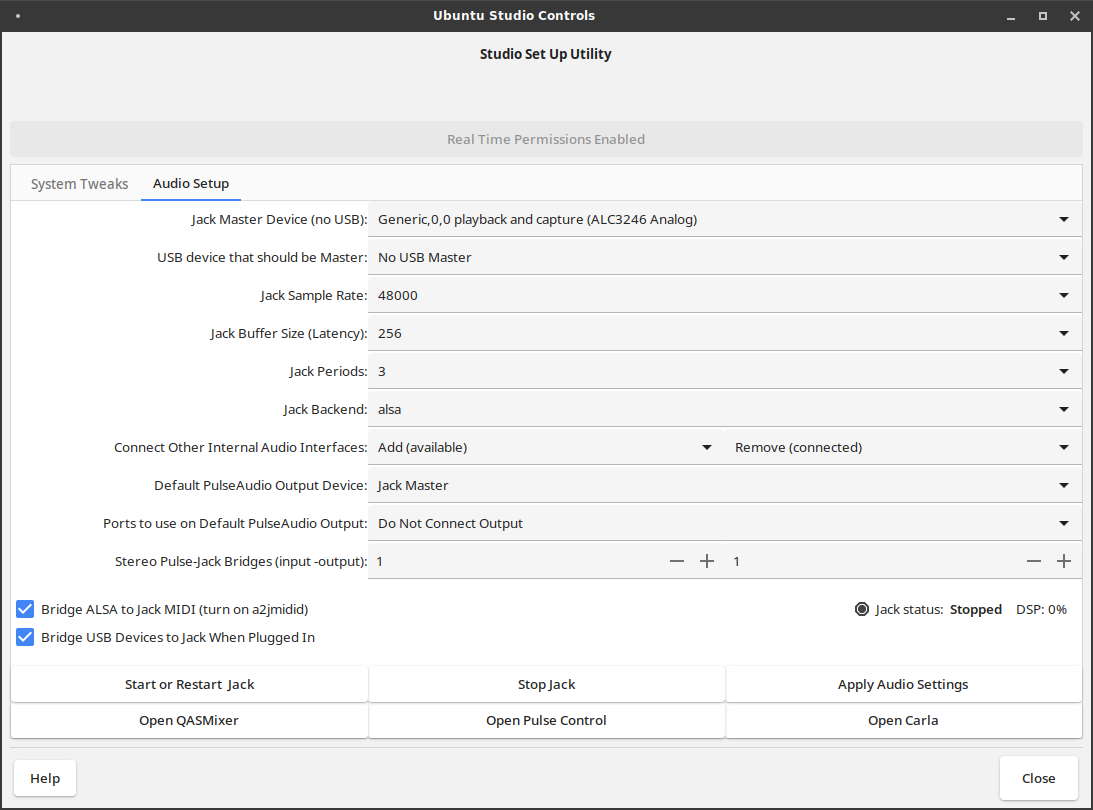
We have already done a lot of work to Ubuntu Studio Controls for 19.10, and as such we have several new features already landing:
These features are currently available in Eoan Ermine’s daily ISO images. After we have determined there has been sufficient testing (or 19.10 is released, whichever comes first), we will backport this version of Ubuntu Studio Controls to our backports PPA.
The Linux Studio Plugins Project is a collection of 91 Ladspa, LV2, and VST audio plugins compatible with Carla, Ardour, and other DAWs. These plugins are to be included by default in Ubuntu Studio 19.10, and are currently available in the Backports PPA for 18.04, 18.10, and 19.04. If you feel as though Ubuntu Studio is lacking in audio plugins, this should no longer be the case.
For a full list of plugins available, check out the official documentation.
If you have not already upgraded from Ubuntu Studio 18.10 to 19.04, you have just over a month left to do so before Ubuntu Studio 18.10 reaches End-Of-Life and will no longer be supported. Ubuntu 18.10 and all official flavors reach End-Of-Life on July 18, 2019. Mark your calendar and upgrade as soon as possible!
Upgrading is available via the Software Updater and the command line “do-release-upgrade” tool.
If you have added the Backports PPA, please install and run ppa-purge tool before upgrading for the best upgrade experience:
sudo apt install ppa-purge
sudo ppa-purge ppa:ubuntustudio-ppa/backports
The Ubuntu Studio team is pleased to announce the beta release of Ubuntu Studio 19.04, codenamed Disco Dingo.
While this beta is reasonably free of any showstopper CD build or installer bugs, you may find some bugs within. This image is, however, reasonably representative of what you will find when Ubuntu Studio 19.04 is released on April 18, 2019.
In terms of new features, Ubuntu Studio 19.04 will include a new version of the Ubuntu Studio Metapackage Installer, renamed to Ubuntu Studio Installer. This package is used to add features you may have opted-out of during installation. With this release, Ubuntu Studio can now be installed on top of a default Ubuntu installation or any flavor thereof such as Kubuntu, Xubuntu, Lubuntu, Ubuntu MATE, Ubuntu Budgie, or Ubuntu Kylin. Documentation on this feature is coming soon.
Another major new feature is the addition of the upcoming Carla 2.0, originally from the KXStudio project. Carla is an audio plugin host and graphical patchbay which can be used as an audio plugin itself, and also can be used as a bridge to use VST plugins compiled for Windows using WINE. Please note that this WINE bridge is not installed by default, but is available in the Ubuntu repositories.
With the addition of Carla, jack-rack has been removed from the default installation for obsolescence reasons, and because Carla duplicates its functionality.
Also included are new GTK and icon themes which modernize the look and feel of Ubuntu Studio.
There is a known bug with the installer. Due to the new theme, there are occurrences of black text on a dark gray background. We intend to fix this before 19.04 is released. (Bug #1822134)
Official Ubuntu Studio release notes can be found at https://wiki.ubuntu.com/DiscoDingo/ReleaseNotes/UbuntuStudio
Further known issues, mostly pertaining to the desktop environment, can be found at https://wiki.xubuntu.org/releases/19.04/release-notes
Additionally, the main Ubuntu release notes contain more generic issues: https://wiki.ubuntu.com/DiscoDingo/ReleaseNotes
To upgrade to Ubuntu Studio 19.04 Beta, follow these instructions:
https://help.ubuntu.com/community/DiscoUpgrades
The Ubuntu Studio 19.04 Beta images can be downloaded at:
http://cdimage.ubuntu.com/ubuntustudio/releases/disco/beta/
During a meeting of the Ubuntu Developer Membership Board on March 11, 2019, two Ubuntu Studio developers, Council Chair Erich Eickmeyer and Council Member Ross Gammon, successfully applied for and received upload rights to Ubuntu Studio’s core packages, fulfilling the requirements prescribed in https://wiki.ubuntu.com/RecognizedFlavors.
We would like to thank the community for staying with us through this uncertain time, and thank the Ubuntu Developer Membership Board for approving Erich and Ross’s applications.
The release of Ubuntu Studio 19.04 will remain on-course. Beta is scheduled for March 28th, Release Candidate for April 11th, and Final Release scheduled for April 18th.
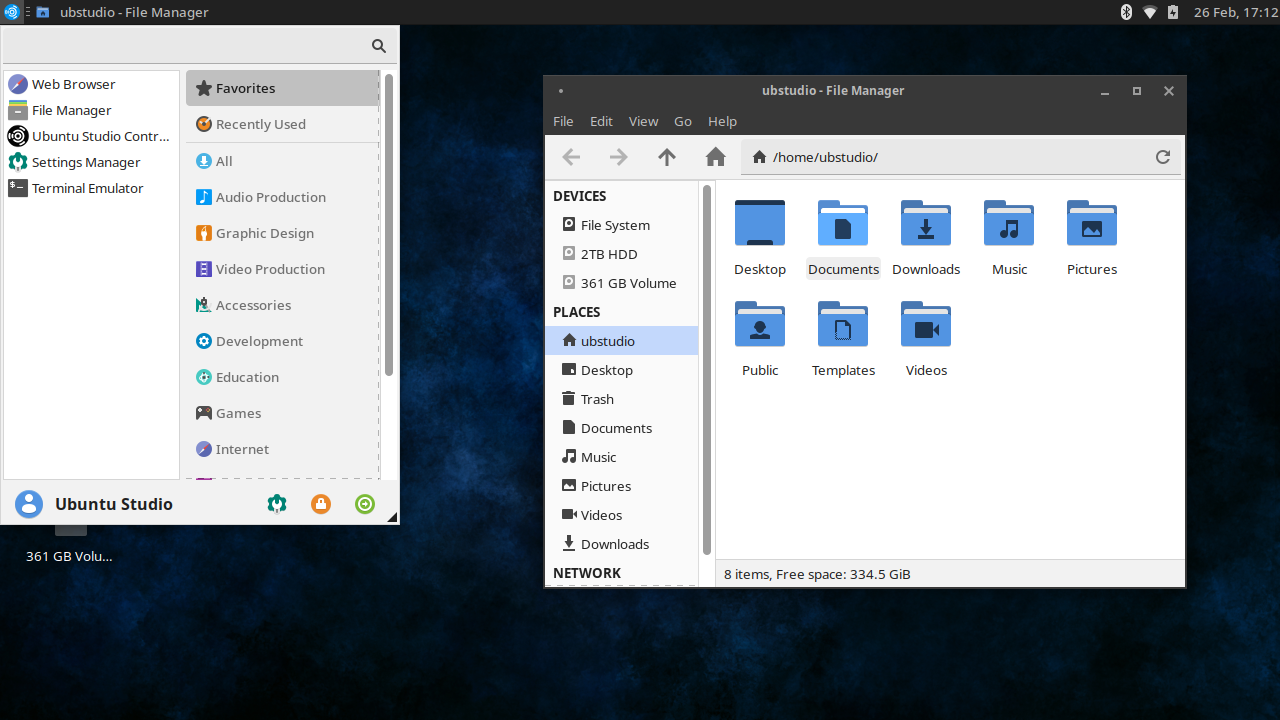
With Ubuntu 19.04’s feature freeze quickly approaching, we would like to announce the new updates coming to Ubuntu Studio 19.04.
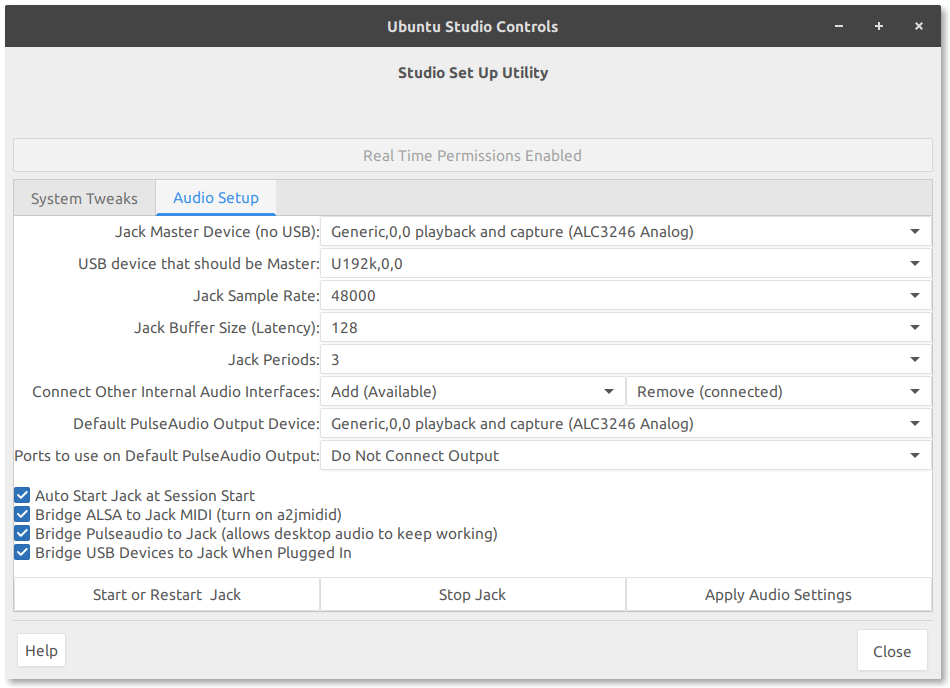
This is really a bit of a bugfix for the version of Ubuntu Studio Controls that landed in 18.10. Ubuntu Studio Controls dramatically simplifies audio setup for the JACK Audio Connection Kit on your Ubuntu installation, and is the only GUI tool that enables JACK to automatically detect hotplugged USB audio devices along with allowing more than one audio device to be connected to JACK simultaneously.
Because Ubuntu Studio Controls is easy to use, we found it was also easier to support than the stack available in Ubuntu Studio 18.04. For this reason, among others, we have created an Ubuntu Studio Backports PPA, and will backport the newer versions of the Ubuntu Studio tools and select applications to this PPA. Please do keep in mind that this PPA is not supported by Ubuntu. Use it at your own risk. Support is provided by the Ubuntu Studio team only.
If you are on Ubuntu Studio 18.04 or newer, simply add this PPA by typing the following into your terminal:
sudo add-apt-repository ppa:ubuntustudio-ppa/backportsWhile support for Ubuntu Studio 18.04 was supposed to end in January due to its non-LTS status, we have decided to support it until the release of 20.04, and we felt a Backports PPA was the best way to do this. There will be no releases of Ubuntu Studio 18.04.x ISO, but updating the already-available ISO as well as adding the backports PPA will keep you up-to-date and allow the Ubuntu Studio team to support you better.
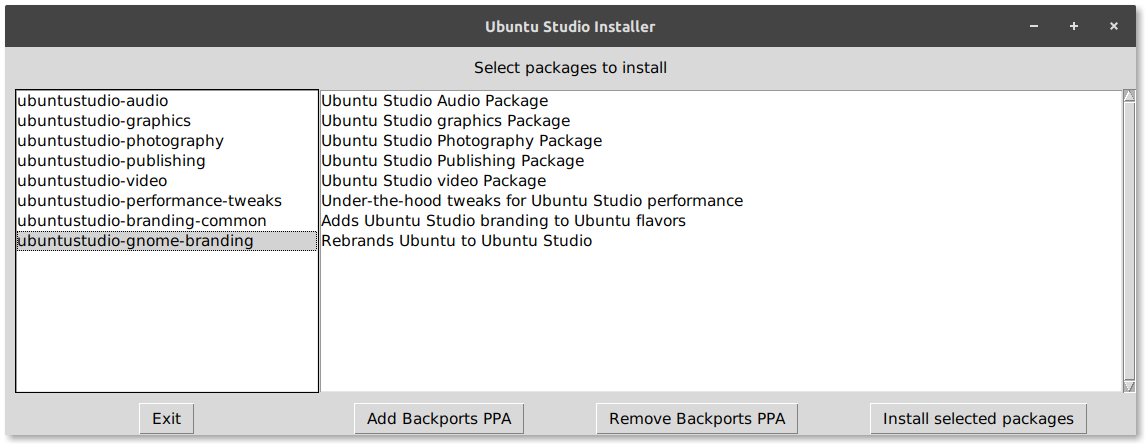
In the past, Ubuntu Studio Meta Installer had been a tool used to install metapackages of various creative application categories. Now, Ubuntu Studio Installer can be used to install not only those metapackages, but also the under-the-hood tweaks used to enable real-time audio processing and reduce the default swappiness, which dictates when the system starts moving unused portions of RAM to the hard drive swap file. This increases overall performance for most applications, but is not recommended for systems with less than 4GB of RAM. Also included is the lowlatency Linux kernel, as well as the option to move the lowlatency kernel to the top of your GRUB bootloader menu, making it the default which is especially useful for audio production.
With these changes, Ubuntu Studio Installer allows you to install Ubuntu Studio as a ToolKit on top of your existing Ubuntu installation, including official flavors (Kubuntu, Xubuntu, Lubuntu, Ubuntu MATE, Ubuntu Budgie), although our default ISO installer is based on Xubuntu.
Additionally, Ubuntu Studio will allow you to rebrand your Ubuntu (or flavor) install as Ubuntu Studio, theming your GRUB menu and Plymouth theme accordingly. For Ubuntu (proper), it will also re-theme your GDM login screen to Ubuntu Studio, and install the vanilla GNOME session which more closely matches the Ubuntu Studio branding, and install GNOME Tweaks to allow you to retheme using our Numix Blue theme and icon theme. These items are purely cosmetic, but we believe it adds to the Ubuntu Studio experience.
The Ubuntu Studio Installer will also give you the option to add the backports PPA mentioned above.
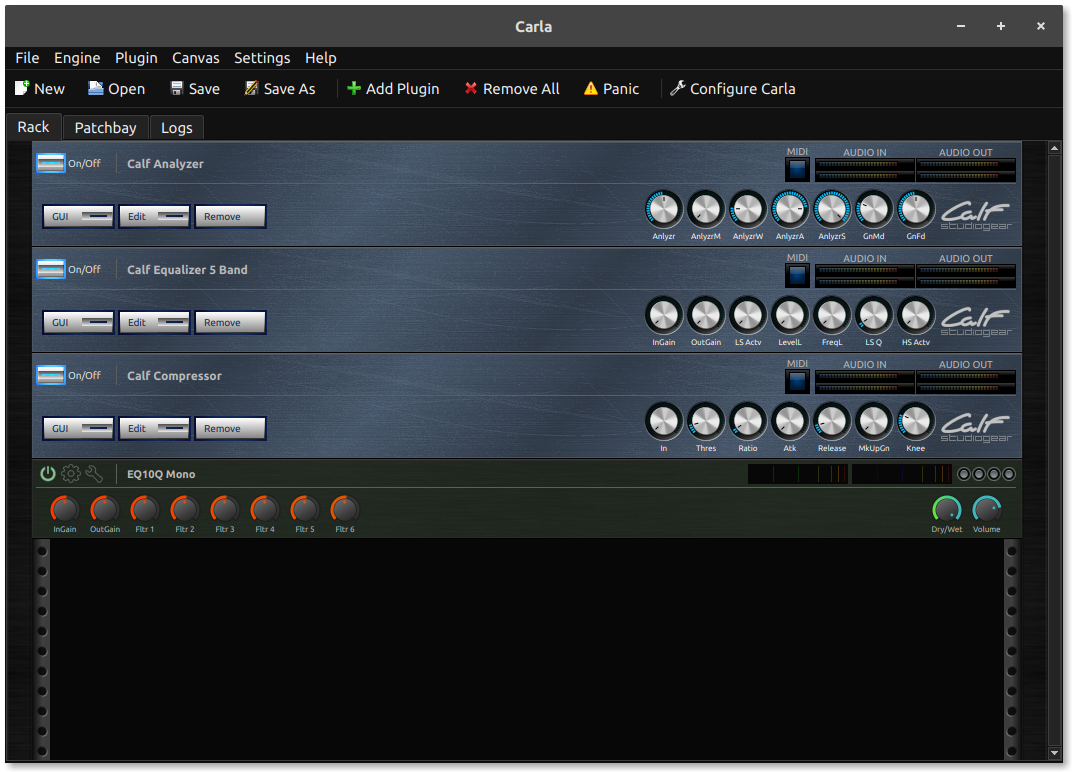
The ubiquitous JACK routing tool, Patchage, is no longer developed. This has made finding a replacement a priority. The Ubuntu Studio Team determined a good replacement to be Carla from KXStudio. We have been working closely with the upstream developer to add this tool as not only a replacement for Patchage, but to add a high-quality plugin host as well. Carla includes a graphical patchbay and experimental features such as the ability to host Windows VST audio plugins (the Windows bridge will not be installed by default and must be added after Ubuntu Studio installation). This has been a much-requested feature and we hope it helps audio producers everywhere.
Carla will be available in Ubuntu Studio 19.04 as well as our Backports PPA.
We hope you like the new, simplified, Plymouth Boot Theme coming to Ubuntu Studio 19.04, which will be added to our Backports PPA.

We have added a new way to receive official support from the Ubuntu Studio team, as well as a way to connect the community: Telegram. Telegram is an instant-messaging app available for Linux, Windows, Mac, Android, and iOS. As such, we have created a bridge from our brand-new Telegram groups to our official Ubuntu Studio IRC channels, expanding the methods in which to connect our community and offer support. Additionally, we encourage our community to offer support to each other via Telegram and IRC.
Click Here to join our official Ubuntu Studio Support Telegram Group
Click Here to join our Ubuntu Studio Café (non-support) Telegram Group
Our council chair, Erich Eickmeyer, recently appeared on the Destination Linux podcast to discuss these items. Check it out! https://destinationlinux.org/episode-108/
The Ubuntu Studio team is pleased to announce the final beta release of Ubuntu Studio 18.10 Cosmic Cuttlefish.
While this beta is reasonably free of any showstopper CD build or installer bugs, you may find some bugs within. This image is, however, reasonably representative of what you will find when Ubuntu Studio 18.10 is released on October 18, 2018.
In terms of new features, Ubuntu Studio 18.10 will include the latest release of Ubuntu Studio Controls which will configure the JACK Audio Connection Kit to automatically detect and add hot-plugged USB audio devices as well as allow one to use multiple audio devices simultaneously. This is done independently of QJackCtl and is the first graphical tool to create such a configuration for the user out-of-the-box, making it a unique feature for Ubuntu Studio among operating systems for audio production. Another feature of Ubuntu Studio Controls is its ability to set the CPU governor to “Performance” for performance-heavy tasks such as audio production or to “Ondemand” for default CPU performance to save energy.
Among those applications upgraded in this release is GIMP 2.10, which saw its release shortly before the release of Ubuntu Studio 18.04. Due to a library conflict between GIMP 2.10 and MyPaint, we had to make the hard decision to drop MyPaint from the default installation of Ubuntu Studio, citing other tools, such as Krita, as filling a similar role in graphical art production. As such, if both are installed and you wish to upgrade to Ubuntu Studio 18.10, you must uninstall GIMP or MyPaint for the upgrade to be successful. We apologize for this inconvenience. At this time, we are waiting for the upstream developers of MyPaint to release a new version based on libmypaint 1.3 before both can be co-installable again.
To upgrade to Ubuntu Studio 18.10 Beta from Ubuntu Studio 18.04, follow these instructions:
https://help.ubuntu.com/community/CosmicUpgrades
The Ubuntu Studio 18.10 Beta images can be downloaded at:
http://cdimage.ubuntu.com/ubuntustudio/releases/cosmic/beta/