The Ubuntu Studio team is pleased to announce the beta release of Ubuntu Studio 26.04 LTS, codenamed “Resolute Raccoon”.
While this beta is reasonably free of any showstopper installer bugs, you will find some bugs within. This image is, however, mostly representative of what you will find when Ubuntu Studio 26.04 LTS is released on April 17, 2026.
As an LTS release, Ubuntu Studio 26.04 will be supported for 3 years until April 2029. We encourage everyone to try this image and report bugs to improve our final release.
Special Notes
The Ubuntu Studio 26.04 LTS disk image (ISO) exceeds 4 GB and cannot be downloaded to some file systems such as FAT32 and may not be readable when burned to a DVD. For this reason, we recommend downloading to a compatible file system. When creating a boot medium, we recommend creating a bootable USB stick with the ISO image or burning to a Dual-Layer DVD.
Images can be obtained from this link: https://cdimage.ubuntu.com/ubuntustudio/releases/26.04/beta/
Full updated information, including Upgrade Instructions, are available in the Release Notes.
Please note that upgrading from 24.04 LTS before the release of 26.04.1, due August 2026, is unsupported.
Only Install What You Need
A common piece of feedback we hear is that people prefer to start with a lean base and install only the tools they actually use, rather than getting an overwhelming number of pre-installed packages. We hear you.
Ubuntu Studio includes a minimal install option in the installer, and has since 24.10! This gives you the Ubuntu Studio desktop experience: the theme, the audio configuration and the optimized settings without the full suite of creative applications. From there, you can use Ubuntu Studio Installer to add exactly the workflows you want: audio, graphics, video, photography, or publishing; à la carte.
Alternatively, if you’re already running Kubuntu, Ubuntu, Lubuntu, Xubuntu, or any other official Ubuntu flavor, you don’t have to reinstall at all. Just install the Ubuntu Studio Installer package and pick the components you need. This has always been an option, but we want to make sure everyone knows about it.
The full install remains available for those who want a complete creative workstation out of the box, and that’s a perfectly valid choice too.
New Features This Release
This is an LTS release, which means stability and polish have been the primary focus. That said, there’s a lot that’s new and improved since 24.04 LTS.
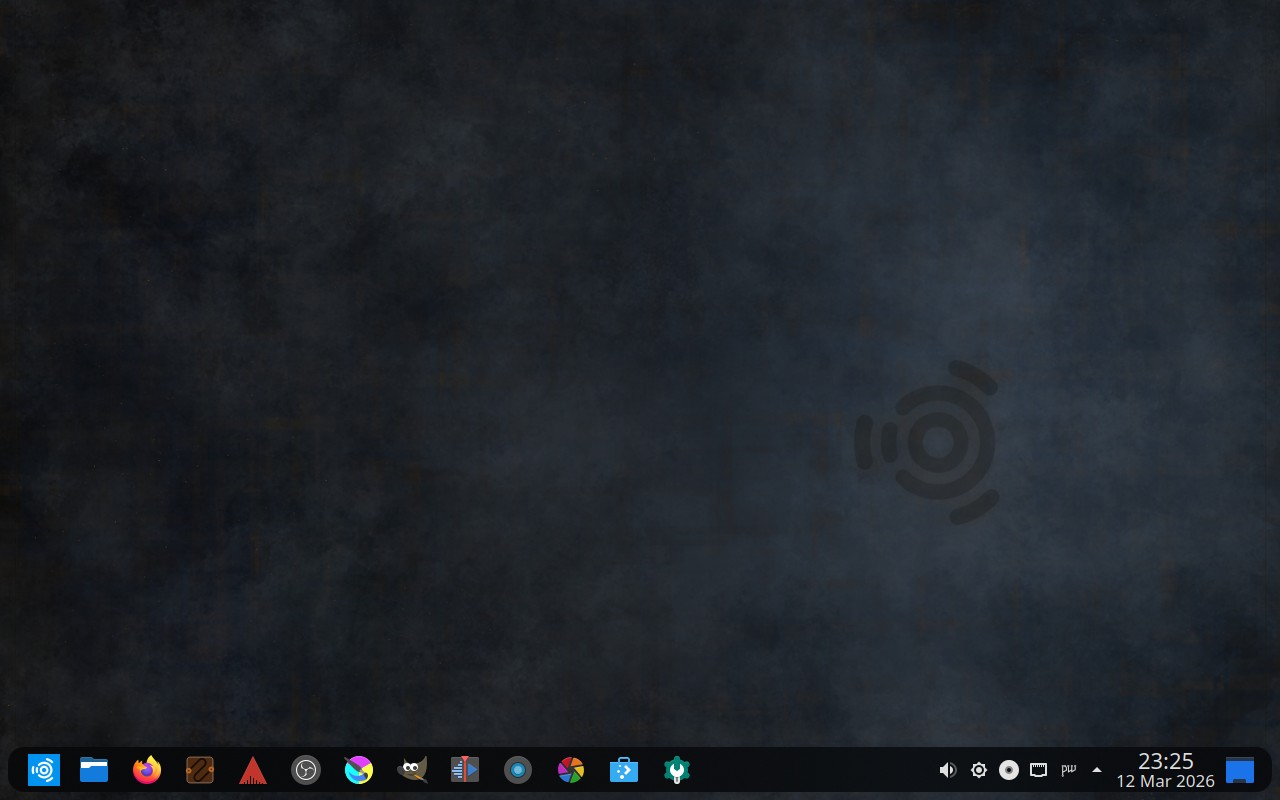
- Three Desktop Layouts: As previously announced, Ubuntu Studio 26.04 LTS now ships with three selectable desktop layouts: the classic Ubuntu Studio top panel, a macOS-like layout with a global menu and bottom dock, and a new Windows 10-like bottom panel layout. This gives users coming from any platform a familiar starting point.
- By Popular Vote: Our community decided in a vote on Ubuntu Discourse to make the bottom panel (traditional) layout the default. The classic top panel remains as an alternate look-and-feel theme.
- Ubuntu Studio Installer and Audio Configuration completely rewritten: Both tools have been rewritten from scratch in Python with dual GTK4 and Qt6 UI backends. The application automatically detects your desktop environment and launches the appropriate interface. Ubuntu Studio Audio Configuration now includes FFADO support for FireWire audio devices and PipeWire buffer/sample-rate configuration via dropdown menus instead of text entry. Both tools include translations for 21 languages.
- New Borealis sound theme replaces the Ocean sound theme. This is the sound theme Ubuntu Studio used clear back in the early (7.10 Gutsy Gibbon) days, and now it’s back!
- Live session improvements: The screensaver and lock screen are now inhibited during the entire live session, fixing a long-standing annoyance where the screen would lock and prompt for a non-existent password.
- Loopino is a new lightweight audio sampler plugin (LV2/CLAP/VST2) for loading, trimming, and looping audio files with drag-and-drop support and on-the-fly recording.
- Plasma PipeWire Settings is a new Plasma applet for managing PipeWire configuration directly from the system tray.
- snd-hdspe is a new DKMS kernel driver for RME HDSPe MADI, AES, RayDAT, AIO, and AIO Pro PCIe sound cards, available in the repositories for those who need it.
- DistroAV (formerly OBS-NDI) is now available in the repositories for network audio/video in OBS Studio using NDI technology.
- PipeWire continues to improve with every release and remains the default audio server.
Major Package Upgrades
- OBS Studio version 32.1.0
- FreeShow version 1.5.9 (snap)
- QPrompt version 2.0.1
- RaySession version 0.17.4
- Patchance version 1.3.2
- Geonkick version 3.7.0
- BChoppr version 1.12.8
- harpwise version 6.34.4
- blender version 5.0.1
There are many other improvements, too numerous to list here. We encourage you to look around the freely-downloadable ISO image.
Known Issues
- There is a minor cosmetic issue in the splash screen when transitioning from the install session to the live desktop session when running the .iso image in that it shows the default KDE Plasma splash as opposed to the Ubuntu Studio splash. This does not occur after installation, and is corrected in later builds.
- You will be prompted, upon first login of any new user, to reboot to apply proper audio configurations for audio production. This is intentional and is a workaround for the installer’s inability to configure the first user as part of the “audio” group or for new users to be added to the audio group automatically.
- Official Ubuntu Studio release notes can be found at https://discourse.ubuntu.com/t/ubuntu-studio-26-04-lts-release-notes/
- Further known issues, mostly pertaining to the desktop environment, can be found at https://wiki.ubuntu.com/ResoluteRaccoon/ReleaseNotes/Kubuntu
- Additionally, the main Ubuntu release notes contain more generic issues: https://discourse.ubuntu.com/t/resolute-raccoon-release-notes/
How You Can Help
Please test using the test cases on https://iso.qa.ubuntu.com. All you need is a Launchpad account to get started.
Additionally, we need financial contributions. Our project lead, Erich Eickmeyer, is working long hours on this project and trying to generate a part-time income. Go here to see how you can contribute financially (options are also in the sidebar).
Frequently Asked Questions
Q: Does Ubuntu Studio contain snaps? A: Yes. Mozilla’s distribution agreement with Canonical changed, and Ubuntu was forced to no longer distribute Firefox in a native .deb package. We have found that, after numerous improvements, Firefox now performs just as well as the native .deb package did.
Thunderbird is also a snap in order for the maintainers to get security patches delivered faster. This is done by the Thunderbird team in cooperation with Canonical.
Additionally, FreeShow is an Electron-based application. Electron-based applications cannot be packaged in the Ubuntu repositories in that they cannot be packaged in a traditional Debian source package. While such apps do have a build system to create a .deb binary package, it circumvents the source package build system in Launchpad, which is required when packaging for Ubuntu. However, Electron apps also have a facility for creating snaps, which can be uploaded and included. Therefore, for FreeShow to be included in Ubuntu Studio, it had to be packaged as a snap.
Also, to keep theming consistent, all included themes are snapped in addition to the included .deb versions so that snaps stay consistent with our themes.
We are working with Canonical to make sure that the quality of snaps goes up with each release, so we please ask that you give snaps a chance instead of writing them off completely.
Q: If I install this Beta release, will I have to reinstall when the final release comes out? A: No. If you keep it updated, your installation will automatically become the final release.
Q: Will you make an ISO with {my favorite desktop environment}? A: To do so would require creating an entirely new flavor of Ubuntu, which would require going through the Official Ubuntu Flavor application process. Since we’re completely volunteer-run, we don’t have the time or resources to do this. Instead, we recommend you download the official flavor for the desktop environment of your choice and use Ubuntu Studio Installer to get Ubuntu Studio — which does not convert that flavor to Ubuntu Studio but adds its benefits.
Q: What if I don’t want all these packages installed on my machine? A: See the “Only Install What You Need” section above. Use the minimal install option and then add only the workflows you want with Ubuntu Studio Installer.